--- title: Required configuration description: Structure website content and crawler settings for DocSearch indexing. --- Follow these requirements so the crawler can extract structured records from your website. Update your markup and crawler configuration where needed. :::info If your website uses one of [the supported framework integrations][1], its generated markup might already meet these requirements. Confirm that the crawler selectors match your framework and version. ::: ## Generic configuration example Start with the default DocSearch configuration template. For more customization options, see [complex record extractors][12]. If you use a [framework integration][13], see the [configuration templates][11].
docsearch-default.js
```js new Crawler({ appId: 'YOUR_APP_ID', apiKey: 'YOUR_API_KEY', startUrls: ['https://YOUR_START_URL.io/'], sitemaps: ['https://YOUR_START_URL.io/sitemap.xml'], actions: [ { indexName: 'YOUR_INDEX_NAME', pathsToMatch: ['https://YOUR_START_URL.io/**'], recordExtractor: ({ helpers }) => { return helpers.docsearch({ recordProps: { lvl0: { selectors: '', defaultValue: 'Documentation', }, lvl1: ['header h1', 'article h1', 'main h1', 'h1', 'head > title'], lvl2: ['article h2', 'main h2', 'h2'], lvl3: ['article h3', 'main h3', 'h3'], lvl4: ['article h4', 'main h4', 'h4'], lvl5: ['article h5', 'main h5', 'h5'], lvl6: ['article h6', 'main h6', 'h6'], content: ['article p, article li', 'main p, main li', 'p, li'], }, aggregateContent: true, recordVersion: 'v3', }); }, }, ], initialIndexSettings: { YOUR_INDEX_NAME: { attributesForFaceting: ['type', 'lang', 'language', 'version'], attributesToRetrieve: [ 'hierarchy', 'content', 'anchor', 'url', 'url_without_anchor', 'type', 'lang', 'language', 'version', ], attributesToHighlight: ['hierarchy', 'content'], attributesToSnippet: ['content:10'], camelCaseAttributes: ['hierarchy', 'content'], searchableAttributes: [ 'unordered(hierarchy.lvl0)', 'unordered(hierarchy.lvl1)', 'unordered(hierarchy.lvl2)', 'unordered(hierarchy.lvl3)', 'unordered(hierarchy.lvl4)', 'unordered(hierarchy.lvl5)', 'unordered(hierarchy.lvl6)', 'content', ], distinct: true, attributeForDistinct: 'url', customRanking: [ 'desc(weight.pageRank)', 'desc(weight.level)', 'asc(weight.position)', ], ranking: [ 'words', 'filters', 'typo', 'attribute', 'proximity', 'exact', 'custom', ], highlightPreTag: '', highlightPostTag: '', minWordSizefor1Typo: 3, minWordSizefor2Typos: 7, allowTyposOnNumericTokens: false, minProximity: 1, ignorePlurals: true, advancedSyntax: true, attributeCriteriaComputedByMinProximity: true, removeWordsIfNoResults: 'allOptional', separatorsToIndex: '_', }, }, }); ```
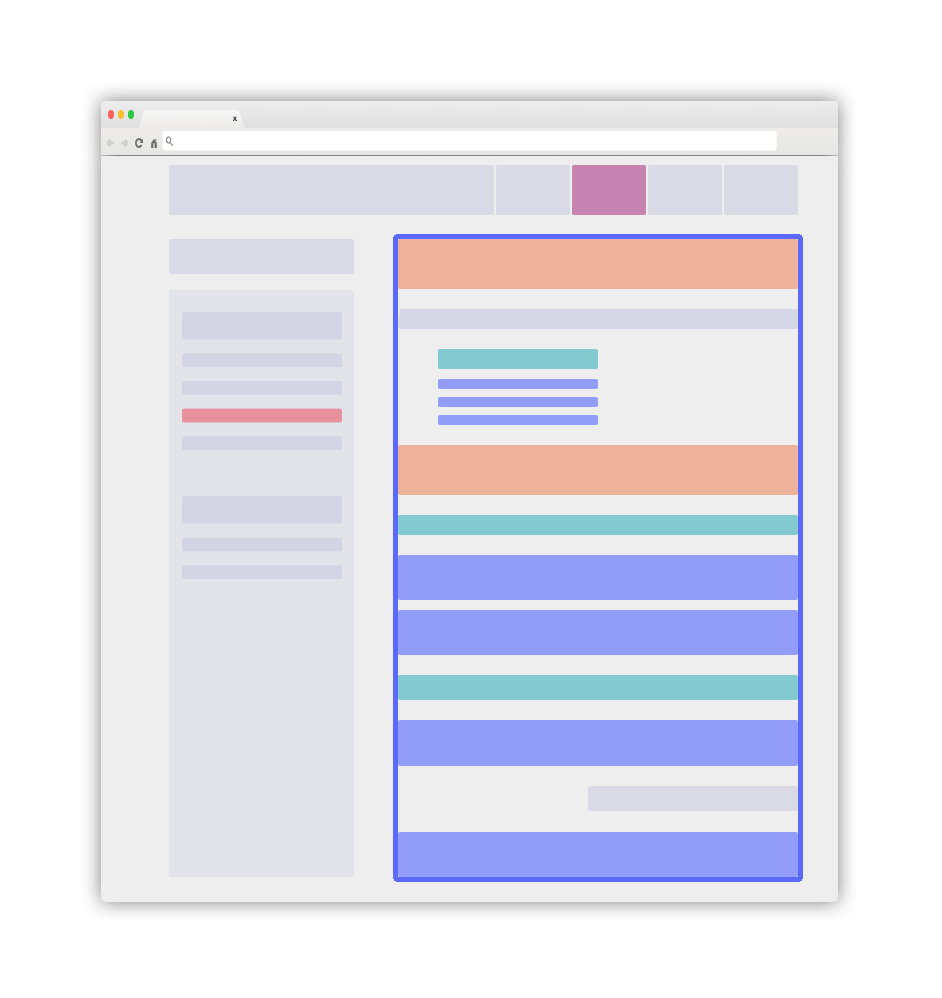
`recordVersion: 'v3'` selects the crawler record schema. It isn't the DocSearch UI version and works with the v5 frontend packages. If you expose `lang`, `language`, or `version` as v5 facets, add those attributes to `attributesForFaceting`. Keep a badge attribute in `attributesToRetrieve` when you pass it to [`resultBadgeKey`][15]. ### Overview of a clear layout Use a page layout that separates documentation content from navigation and other page elements: Recommended layout for your page Use the main blue element as your `.DocSearch-content` container. Follow the next guidelines to structure its contents. ### Use the right classes as [`recordProps`][2] Add static classes to identify each content role. These classes don't need to change the page's appearance. The crawler uses them to extract structured records. - Add a static `DocSearch-content` class to the main container for your text. This container is usually a `
` or `
` element. - Configure every searchable `lvl` element outside the main documentation container, such as a sidebar item, as a `global` selector. The crawler adds these elements to every record from the page. Keep levels in increasing order in the document flow: `lvlX` should follow `lvlY` when `X > Y`. - Use standard heading elements, such as `h1`, `h2`, and `h3`, for `lvlX` selectors. You can also use static classes. Add a unique `id` or `name` attribute to each matching element. - Give every element that matches an `lvlX` selector a unique `id` or `name` attribute. DocSearch uses this anchor to open the page at the matching element. - V5 builds result breadcrumbs from the populated `hierarchy.lvl0` through `hierarchy.lvl6` attributes. Keep heading levels ordered, avoid gaps where possible, and retrieve the full `hierarchy` object. - Wrap every element that matches the `recordProps.content` selector in a `

` or `

  • ` element. Split text into focused blocks, and don't nest matching elements because this creates duplicate records. - Keep the content structure consistent throughout the document. ## Introduce global information as meta tags The crawler automatically extracts information from DocSearch-specific meta tags: ```html title="index.html" ``` The crawler adds the `content` value of these `meta` tags to every record extracted from the page. Each tag's `name` attribute must follow the `docsearch:$NAME` pattern, where `$NAME` is the record attribute to set. The `docsearch:version` meta tag can be a set [of comma-separated tokens][5], each of which is a version relevant to the page. These tokens must be compliant with [the SemVer specification][6] or only contain alphanumeric characters (e.g. `latest`, `next`, etc.). As facet filters, these version tokens are case-insensitive. For example, add the following meta tag to assign two versions to every record on a page: ```html title="index.html" ``` The crawler adds the following `version` attribute to each record: ```json title="record.json" { "version": ["2.0.0-alpha.62", "latest"] } ``` Add these attributes to `attributesForFaceting`. You can then use them in per-index `facetFilters` or expose up to five controls with the v5 [`facets` option][10]. To show `version` in each result, retrieve it and set [`resultBadgeKey`][15] to `version`. ## Nice to have - Keep your [sitemap][7] up to date so the crawler can identify changed pages. The crawler also discovers eligible links from crawled pages. - Ensure that every page provides its full context. Use global elements where appropriate. - Make your documentation content available without client-side JavaScript rendering. If your website requires JavaScript rendering, [set `renderJavaScript: true` in your configuration][8]. Any questions? Connect with us on [Discord][14] or [support][9]. [1]: /docs/integrations [2]: record-extractor#recordprops-api-reference [3]: https://www.algolia.com/doc/guides/managing-results/refine-results/faceting/ [5]: https://html.spec.whatwg.org/dev/common-microsyntaxes.html#comma-separated-tokens [6]: https://semver.org/ [7]: https://www.sitemaps.org/ [8]: https://www.algolia.com/doc/tools/crawler/apis/configuration/render-java-script/ [9]: https://support.algolia.com/ [10]: /docs/packages/js/api-reference#facets [11]: /docs/templates [12]: /docs/record-extractor#introduction [13]: /docs/integrations [14]: https://alg.li/discord [15]: /docs/packages/js/api-reference#resultbadgekey